How do I customise my ebay page


- Mark as New
- Bookmark
- Subscribe
- Mute
- Subscribe to RSS Feed
- Highlight
- Report Inappropriate Content
on 13-04-2015 09:14 PM
It's been a while since I listed anything so I want to see my active listings at the top of the my ebay summary page. Can someone help with this. Ta.

- Mark as New
- Bookmark
- Subscribe
- Mute
- Subscribe to RSS Feed
- Highlight
- Report Inappropriate Content
on 13-04-2015 09:59 PM
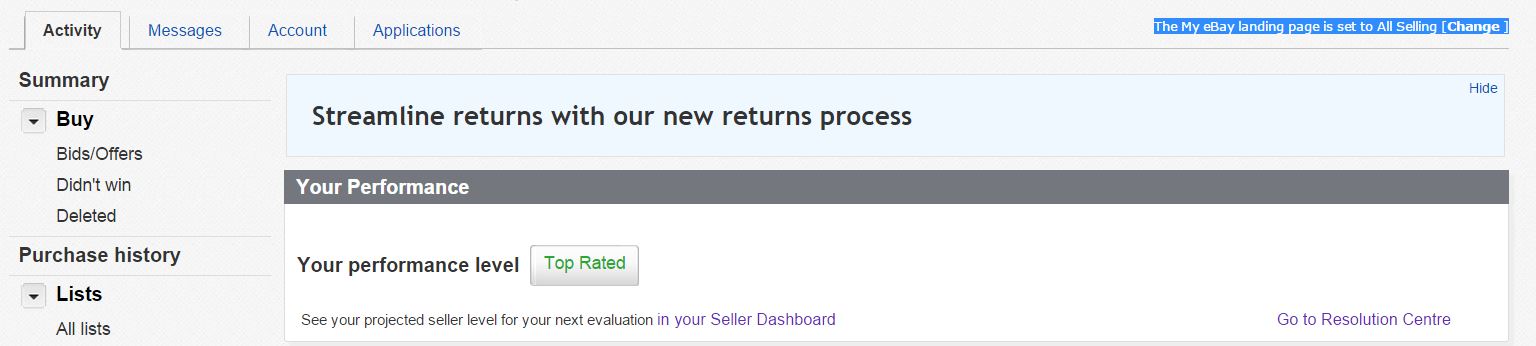
At the top right of your MyeBay summary page you should see The My eBay landing page is set to Summary [Change]
Click the change link and you will get a drop down with choices, just select All Selling or Active listings.
Penny
- Mark as New
- Bookmark
- Subscribe
- Mute
- Subscribe to RSS Feed
- Highlight
- Report Inappropriate Content
on 17-04-2015 12:10 AM
Thanks Penny,
What I have is this;
- Mark as New
- Bookmark
- Subscribe
- Mute
- Subscribe to RSS Feed
- Highlight
- Report Inappropriate Content
on 17-04-2015 09:36 AM
I don't know anything about beta sites.
Is this where you are looking? The bit highlighted on the right is where you change the settings.
Penny
- Mark as New
- Bookmark
- Subscribe
- Mute
- Subscribe to RSS Feed
- Highlight
- Report Inappropriate Content
on 18-04-2015 12:29 AM
Hi Penny,
In the area you have highlighted I see this:
Page options| Summary is your My eBay homepage
Unfortunately I can't modify it in any way despite it saying page options. I can see other pages eg just my Selling page or Watching page. But in My eBay page (or any other page) I can't see what you have highlighted.
If I'm on a beta page or something I'd just like someone to tell me how to get off it. Or If someone can tell me how to navigate to what you have perhaps??


- Mark as New
- Bookmark
- Subscribe
- Mute
- Subscribe to RSS Feed
- Highlight
- Report Inappropriate Content
on 18-04-2015 09:03 PM
@oilzum0 wrote:
If I'm on a beta page or something I'd just like someone to tell me how to get off it. Or If someone can tell me how to navigate to what you have perhaps??
I see the same option as you on My eBay Summary. If I go to my watch list, I get a link at the top that will make my watch list my home page, and if I go to my 'Selling" only, I get the same options as Penny mentioned above - unfortunately, all that allows you to do is change the landing page, though - no further customisations can be done as far as I can see (I can't even change the default number of items in my watch list that are displayed in my summary - I changed it from 10 to 25 before the last round of updates, and now I can't change it back 😞 I can change it from the watch list view, but that doesn't affect the summary view).
- Mark as New
- Bookmark
- Subscribe
- Mute
- Subscribe to RSS Feed
- Highlight
- Report Inappropriate Content
on 19-04-2015 09:55 PM
Thank you both for taking the time to respond. I've sent an email to eBay to see if they can assist. Cheers, Danny.

- Mark as New
- Bookmark
- Subscribe
- Mute
- Subscribe to RSS Feed
- Highlight
- Report Inappropriate Content
on 02-08-2015 05:39 PM
I have the same problem. Previously, if I clicked on "My eBay" I got all my selling first., then I could scroll through all the others. Now, despite what I do, I get my watch list first. I am more interested in what I am selling than in what I am watching. I have tried setting the landing page and the page summary to "Selling" but I still get the watch list first. It did seem to change of its own accord a couple of months ago. I did not re-set it at any time because I was quite happy with it. Is there anything I can do about this?
