

- Mark as New
- Bookmark
- Subscribe
- Mute
- Subscribe to RSS Feed
- Highlight
- Report Inappropriate Content
on 27-01-2018 05:17 PM
The message block does not work if you are already in a transaction with the member or if they have already messaged you.
Those interactions will have to time out before those members are blocked.


- Mark as New
- Bookmark
- Subscribe
- Mute
- Subscribe to RSS Feed
- Highlight
- Report Inappropriate Content
on 27-01-2018 05:42 PM
thanks for the info
3BrNBBRz4UYdo+!~~60_7.JPG "chameleon54")

- Mark as New
- Bookmark
- Subscribe
- Mute
- Subscribe to RSS Feed
- Highlight
- Report Inappropriate Content
on 27-01-2018 07:26 PM
@davidc4430 wrote:how do i make it so blocked buyers cant message me?
i may allready have it set that way as ive not heard back from either of these guys as yet, but i wanna make sure.
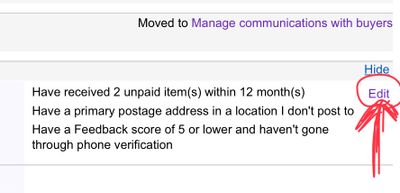
To prevent blocked buyers from contacting you go to
Site preferences - Selling preferences - buyer requirments
A list of options with check boxes appear. The option to prevent blocked buyers from contacting you is the last one at the bottom of the page. Tick for activate, blank box for not activated.
- Mark as New
- Bookmark
- Subscribe
- Mute
- Subscribe to RSS Feed
- Highlight
- Report Inappropriate Content
on 27-01-2018 07:33 PM
When blocked buyers try to make a purchase they see a message in bold red type that says something along the lines of " This seller is not accepting bids or purchases from you at the moment " They are then directed to a smiley help page about general buyer requirements.
- Mark as New
- Bookmark
- Subscribe
- Mute
- Subscribe to RSS Feed
- Highlight
- Report Inappropriate Content
on 27-01-2018 08:43 PM
i cant find that option in my preferences
i do have the buyer requirments, but no list of items with check boxes.

- Mark as New
- Bookmark
- Subscribe
- Mute
- Subscribe to RSS Feed
- Highlight
- Report Inappropriate Content
on 27-01-2018 09:01 PM
- Mark as New
- Bookmark
- Subscribe
- Mute
- Subscribe to RSS Feed
- Highlight
- Report Inappropriate Content
on 27-01-2018 10:08 PM
ok, found it.
fixed it.
thank you to all who have left replies.
- Mark as New
- Bookmark
- Subscribe
- Mute
- Subscribe to RSS Feed
- Highlight
- Report Inappropriate Content
27-01-2018 10:16 PM - edited 27-01-2018 10:18 PM
@davidc4430 wrote:ok, found it.
fixed it.
thank you to all who have left replies.
david, now that that is sorted, can I interest you in a book?

- Mark as New
- Bookmark
- Subscribe
- Mute
- Subscribe to RSS Feed
- Highlight
- Report Inappropriate Content
on 27-01-2018 11:30 PM
@k1ooo-slr-sales wrote:david, now that that is sorted, can I interest you in a book?
_________________________________________________________________________________________________________
................been a while slr.
"Start me up I'll never stop......"
- Mark as New
- Bookmark
- Subscribe
- Mute
- Subscribe to RSS Feed
- Highlight
- Report Inappropriate Content
on 28-01-2018 04:29 AM
@chameleon54 wrote:When blocked buyers try to make a purchase they see a message in bold red type that says something along the lines of " This seller is not accepting bids or purchases from you at the moment " They are then directed to a smiley help page about general buyer requirements.
Yes, I know that chameleon.....but you cannot block a buyer while a transaction is in progress. It has to be completed first before the block takes effect.
It is the same with messages I believe....if the member has already messaged you the block will not tae effect until the message is too old to be answered. All you can do is ignore any other messages that come in.
