- Mark as New
- Bookmark
- Subscribe
- Mute
- Subscribe to RSS Feed
- Highlight
- Report Inappropriate Content
on 20-10-2012 11:50 AM
Are you using selling manager? If you view the selling manager summary, under 'Sold', there's a 'Buyer's eligible for combined purchases', which will show you all buyers who have purchased multiple items and haven't paid yet or received a combined invoice. (If they pay before you send an invoice, they won't show there, and if you send an invoice, they'll be removed from the list).
When you send an invoice, all you need to do is fill in the appropriate amount for each service, then click 'Send'. You don't need to select a service, per se, as the buyer can or will do that via the checkout, and as above, 'Recalculate' is 'Reset to original'.
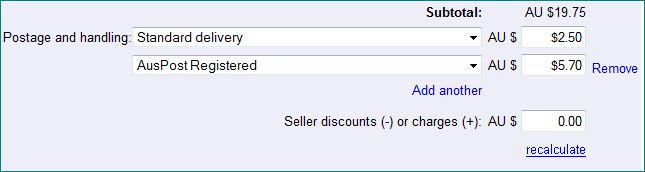
For example, if you had postage at $2 + 50c for each additional item, or $5.20 for registered + 50c for each additional and they buy two items, when you go to send the invoice, you can either fill out the post cost for one item in each field, then put 50c in the field as an additional charge so the invoice looks like this;
.
or put the totals $2.50 in the field for standard post, and $5.70 in the field for registered, so the invoice looks like this: