Stumbled upon a ram disk..


- Mark as New
- Bookmark
- Subscribe
- Mute
- Subscribe to RSS Feed
- Highlight
- Report Inappropriate Content
on 04-05-2020 03:32 PM
So the latest adventure started with checking out how my computer was using ram memory is executing 3D intensive graphics tasks which benchmarked rather poorly as per Performance Test benchmark
I run the benchmark graphics test components and watched memory usage in real time using freeware System Explorer
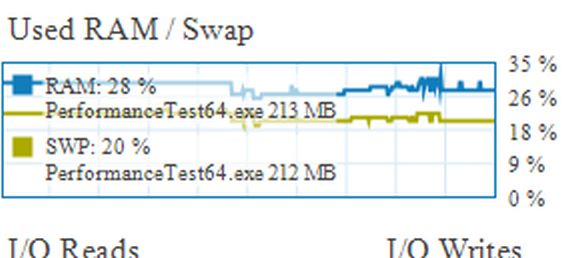
what ? only 28% of system memory being used and still 228MB paged out in virtual memory space on the ssd ?
( high speed storage used in support of computer oparations and tasks = ram memory + memory storage in the form of a dedicated file on the disk drive,( page file) . the former fast , the latter relatively slow)
From my observations did not seem optimal
So what to do ? well maybe trick the app into loading paged out parts of it programming onto high speed ram memory, rather than the lower speed page file on the ssd
sort of a high speed virtual memory - a page file located in ram memory
With extra ram memory now available and usage about half , a ram disk might be worth a try
A ramdisk creates storage space functionally the same as a conventional disk drive most are familar with, but in ram memory space ( but stored data is erased when the computer is shut down)
But this is ideal for creating an additional page file , which can be user configured within Windows via control panel
A good thing is that Windows will tend to use the fastest page file accessable first - so will favour the ram drive page file , once it loads ( will not speed up start up , does tend to slow down start up a little as it takes time to load as is a start up configured app)
Anyhow I found a inept owner friendly ramdisk app , freeware AMD Radeon Ramdisk
Settled on creating a approx 1.2GB ram disk , and then 1GB volume ( displays as a drive in Windows explorer )
8GB total installed ram memory - normal max usage about 4GB - max shared system memory 1.6GB - Windows elbow room 1GB
Configured to start at computer start
so the results - did not make any difference to the benchmarks results - 3D rating remained lamentatable
However did wake up time to complete security scanning of files by 30% faster and web browsing using Edge browser is much more snappier now
So for my normal usage and desired computer performance has been a good improvement
( Another unexpected delight has been quicker duration in shutting down now - and i suppose less wearing of the ssd for longer life)
