How to refund buyer


- Mark as New
- Bookmark
- Subscribe
- Mute
- Subscribe to RSS Feed
- Highlight
- Report Inappropriate Content
on 27-11-2020 09:39 PM
One of my buyers didn't receive their item and I need to refund them. I don't see the option to refund under the listing. I don't think a case was officially opened. Should I tell them to open a case and request a refund? The other option is to go to the paypal transaction and refund from there. Is that a safe option?


- Mark as New
- Bookmark
- Subscribe
- Mute
- Subscribe to RSS Feed
- Highlight
- Report Inappropriate Content
on 28-11-2020 06:54 AM
No don't do either of those.
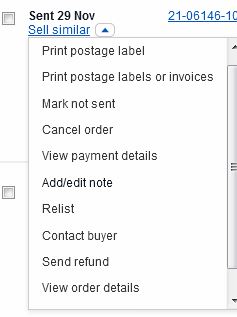
Refunds are now easy under Seller Hub
see All Orders > select the appropriate order > drop down menu has "send refund"
3BrNBBRz4UYdo+!~~60_7.JPG "chameleon54")

- Mark as New
- Bookmark
- Subscribe
- Mute
- Subscribe to RSS Feed
- Highlight
- Report Inappropriate Content
on 28-11-2020 09:29 AM
@curraone wrote:No don't do either of those.
Refunds are now easy under Seller Hub
see All Orders > select the appropriate order > drop down menu has "send refund"
I was about to do a little happy dance if this worked...........Followed your steps.........The option isnt there for me..........

- Mark as New
- Bookmark
- Subscribe
- Mute
- Subscribe to RSS Feed
- Highlight
- Report Inappropriate Content
on 28-11-2020 09:30 AM


- Mark as New
- Bookmark
- Subscribe
- Mute
- Subscribe to RSS Feed
- Highlight
- Report Inappropriate Content
on 28-11-2020 10:34 AM
The only way I have ever refunded (presuming they paid with Paypal) is to locate the sale in your list of sold items, use the dropdown arrow to find "see Paypal transaction", log into Paypal and refund from there. The "refund" button in Paypal is a little scary, as it says "refund this payment", but the next page allows you to adjust the amount if it is not a full refund.
- Mark as New
- Bookmark
- Subscribe
- Mute
- Subscribe to RSS Feed
- Highlight
- Report Inappropriate Content
on 29-11-2020 08:25 AM
@wide-world-of-stamps wrote:
It's only there for sellers on managed payments.
My main account is on managed payments and the option is not there for me. Others are experiencing the same thing, judging by recent threads all expressing the same concern. It appears some sellers have the function, others dont.
- Mark as New
- Bookmark
- Subscribe
- Mute
- Subscribe to RSS Feed
- Highlight
- Report Inappropriate Content
on 29-11-2020 11:25 AM
Are you sure? You have to scroll right down to the end of the options
- Mark as New
- Bookmark
- Subscribe
- Mute
- Subscribe to RSS Feed
- Highlight
- Report Inappropriate Content
on 29-11-2020 11:27 AM
@tcrazer wrote:One of my buyers didn't receive their item and I need to refund them. I don't see the option to refund under the listing. I don't think a case was officially opened. Should I tell them to open a case and request a refund? The other option is to go to the paypal transaction and refund from there. Is that a safe option?
Sorry, I didn't realise you might not be on managed payments.
If you are not, by all means refund through paypal, that's the way we used to do it before.
Try to avoid them opening a case.
- Mark as New
- Bookmark
- Subscribe
- Mute
- Subscribe to RSS Feed
- Highlight
- Report Inappropriate Content
on 29-11-2020 07:16 PM
thanks Currone, yes it is on the store with managed payments once I scroll, I didnt have to scroll before the changes, it was just there. But its not showing on the stores that are not on managed payments.
Sorry for the confusion.
